
The calendar is the central hub for managing daily operations in an ATO, enabling you to schedule and coordinate flights, ground school, simulator sessions, instructors, aircraft, and classrooms in one unified view.
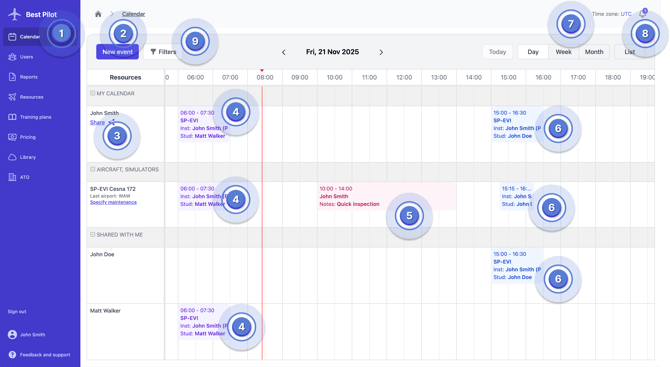
(1) Calendar in menu – opens the main scheduling view where you manage all training activities
(2) New event button – creates a new planned or completed training, reserves resources, declares availability or launches Auto-planning
(3) Personal calendar row – displays all events and duties assigned specifically to the logged-in user
(4) Already registered events (trainings) – registered events visible in the calendar
(5) Reservation – a temporary booking of an aircraft or simulator that can span a single day or multiple days
(6) Planned event (trainings) – upcoming trainings that are scheduled but not yet completed
(7) View mode (day/week/month) – switches between daily, weekly and monthly overviews depending on operational needs
(8) List view of all events – shows all scheduled items in a structured list for easier searching and filtering
(9) Filters tab – allows you to narrow the view by aircraft, instructor, student, location, event type and other parameters