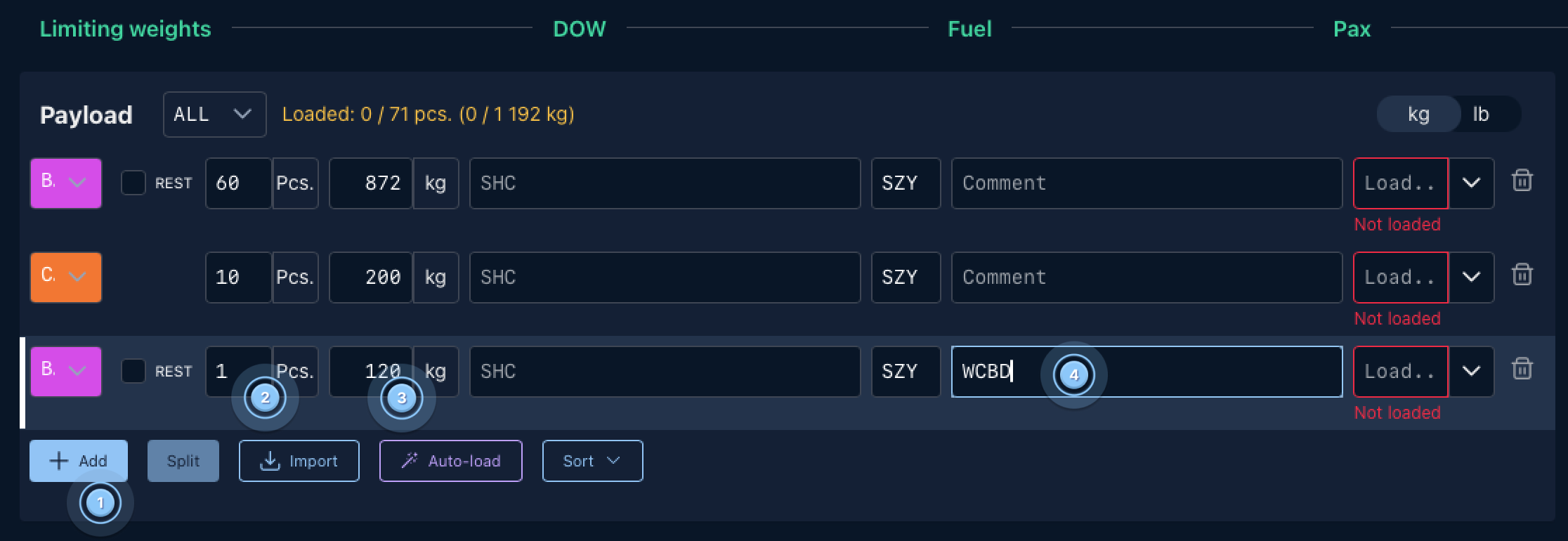
This article explains how to correctly add a wheelchair with a battery (e.g., WCBD, WCBW, WCBL) as a separate entry when the wheelchair must be split into multiple baggage records. Splitting ensures accurate handling, safety compliance, and proper tracking of battery components.
Battery-powered wheelchairs often contain separable components, such as the wheelchair frame and the battery unit. For safety and regulatory reasons, the battery component must sometimes be recorded separately from the wheelchair itself.
-
WCBD – wheelchair with dry cell battery
-
WCBW – wheelchair with wet cell battery
-
WCBL – wheelchair with lithium battery
When the wheelchair and battery are handled separately, the total baggage must be split into multiple entries.
Procedure
1. Open the Payload Tab
Navigate to the Load planning tab in the flight workspace ( 1 ).
This is where baggage and bulk hold items are managed

2. Use "Split" function or add separate item
You can find information on how to use the "split" function for this case here
To record the wheelchair (and/or battery) as a separate item:
- Press + Add ( 1 )
-
Enter the wheelchair values:
Pieces
-
Usually
1( 2 )
Weight (kg)
-
Enter the actual wheelchair weight. ( 3 )
Description
Enter the appropriate wheelchair code: ( 4 )
-
WCBD– Wheelchair with dry battery -
WCBW– Wheelchair with wet battery -
WCBL– Wheelchair with lithium battery